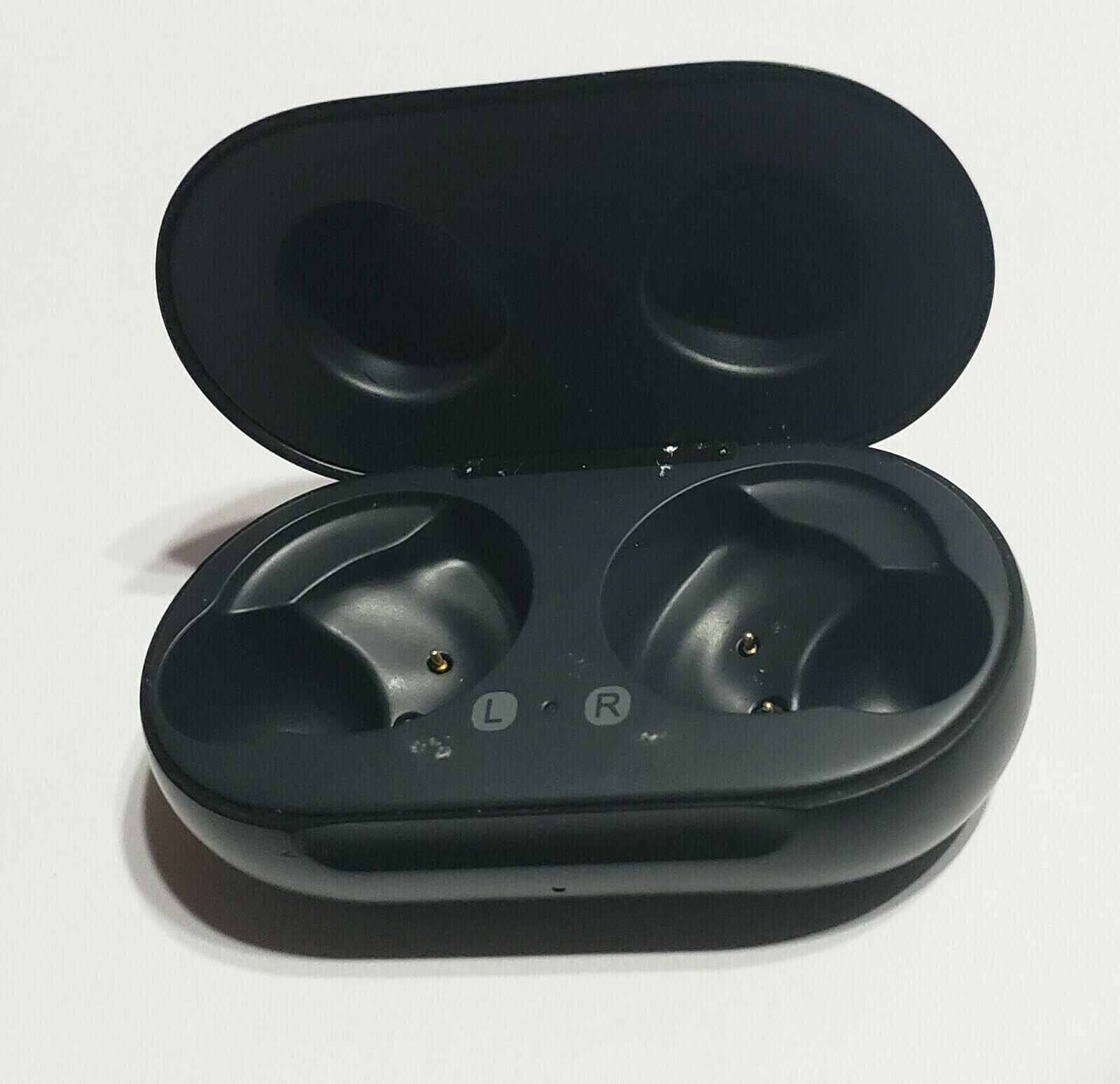
Original Samsung Buds FE SM-R400 Replacement Right /Left /Charging
Case/EartipsUSD $21.59
Condition : Open box
Free Shipping

Notify me when the price drops
We will email you if we find a lower price on this product!
Original Replacement Buds FE SM-R400 by Sam Sung
LEFT SIDE / Right Side or Charging Case Only (no buds) or 10 PCS EARTIPS see pictures ( 4 ear wing. 6 ear tips)
CONDITION:
Open Box - Item is like new Condition .No Scratches .
Item has been fully inspected, tested and works great!
Auction is for a single, replacement earbud (left or right) OR replacement charging case only.
NO WING TIPS.
NO CABLES, NO ACCESSORIES, NO RETAIL BOX
Tips for set up:
The VIDEO :
https://www.youtube.com/watch?v=EYN2PwjSZsMPlease fully charge buds and charging case until they start to pair!
Before you try out the recommendations below, be sure to check if your device's software and related apps are updated to the latest version. To update your mobile device's software, follow these steps:
Step 1. Go to Settings > Software update.
Step 2. Tap on Download and install.
Step 3. Follow the on-screen instructions.
Note: The earbuds that your are trying to couple/link should be the same model and of opposite sides e.g. Galaxy Buds Pro left earbud can only be coupled with a Galaxy Buds Pro right earbud
How to sync the earbuds to each other.
If you recently damaged or lost one of your earbuds set and bought a replacement, you can easily connect the original earbud to the newly purchased earbud. Coupling is required to adjust the volume and delay between both earbuds. Follow the steps below to self-couple your earbuds.
Step 1. Check the direction of each earbud, the newly purchased earbud and original earbud, and correctly insert them into their corresponding slots in the charging case.
Step 2. Touch and hold both earbuds touch areas for 7 seconds or more. The earbuds battery indicator light will flash green and then return to the initial light. Then, the earbuds are coupled.
Step 3. When the earbuds are coupled, you will be able to reconnect to your compatible devices.
Find out more about how to connect your Galaxy Buds via the Galaxy Wearable app at ‘How to connect and update Galaxy Buds+ with Galaxy Smartphone’ with Samsung Support.
Note: The battery indicator on the charging case will keep flashing red when the earbuds are not coupled properly. Remove the earbuds from the charging case and insert them again.
Additional Tip for self-coupling your earbuds
If you cannot complete coupling with a new earbud, make sure the Block touches feature of the original earbuds is disabled on the Galaxy Wearable app. Try disabling Block touches by following the steps below.
Step 1. Open the Galaxy Wearable a
Step 2. Tap the switch to disable Block touches.
Additional Tip for self-coupling your earbuds
If you cannot complete coupling with a new earbud, make sure the Block touches feature of the original earbuds is disabled on the Galaxy Wearable app. Try disabling Block touches by following the steps below.
Step 1. Open the Galaxy Wearable app.
Step 2. Tap the switch to disable Block touches.
CAN NOT PAIR WITH SAMSUNG BUDS LIVE R180, BUDS2 R177, BUDS Pro R190. THIS IS BUDS FE R400
we records the serial Number of each of our products
PLEASE do not attempt to buy & return something different
What's Included :
SAMSUNG Buds FE R400 LEFT OR RIGHT EARBUD or CHARGING CASETerms & Conditionsusps shipping fee is non refundable when you return item.Feedback:• If you have any questions or concerns, please contact us before leaving a negative feedback, we are here to help you and offer the best support we can. • If, for any reason you are not satisfied with your purchase, please contact us via Ebay Message and we will do our best to resolve it. Please don't leave neutral or negative feedback without any communication with us Payment: All payments are processed through ebay's managed payments. Forms of payment accepted are PayPal, G Pay, Apple Pay, VISA, Mastercard, American Express, and Discover.• We ONLY ship to confirmed addresses, please make sure your shipping address is correct before buying an item.Shipping:• We try our best to ship out all items within the same day and no later than one business day after payment is cleared• Orders placed on the weekend or holidays will be shipped on Monday or the next working day• We do not ship internationally.• PLEASE NOTE: Tracking numbers are not immediately active - please allow up to 48 hours for numbers to update within shipper's tracking systems.Replacement/Exchange:• All return items should be in original packaging and returned within 30 days after you received it. The item needs to be returned in the similar cosmetic condition (serial numbers are tracked). If the item is match with description, but doesn't fit , change mind, didn't like item , found better price or was ordered by mistake etc. we will deduct the 25% restocking fees from this transaction.• We will process returns on same day when requested.. We will check all returned item serial# or part# before process refund or exchange.







 .
.
